
Introduction
One feature I genuinely miss from macOS is Finder tags. Right-click a file, pick "Red", and you get a small coloured dot next to its name and an entry in the sidebar that shows every red file, no matter where it lives. Simple, but I used it all the time for "needs review", "invoices", "work in progress" and so on.
Nautilus (GNOME Files) on Ubuntu 24.04 has nothing like that out of the box. There are emblems, starred files and bookmarks, but no tags with colours. So I built Nautag.
Checkout repository basskibo/nautag on Github directly
What you get
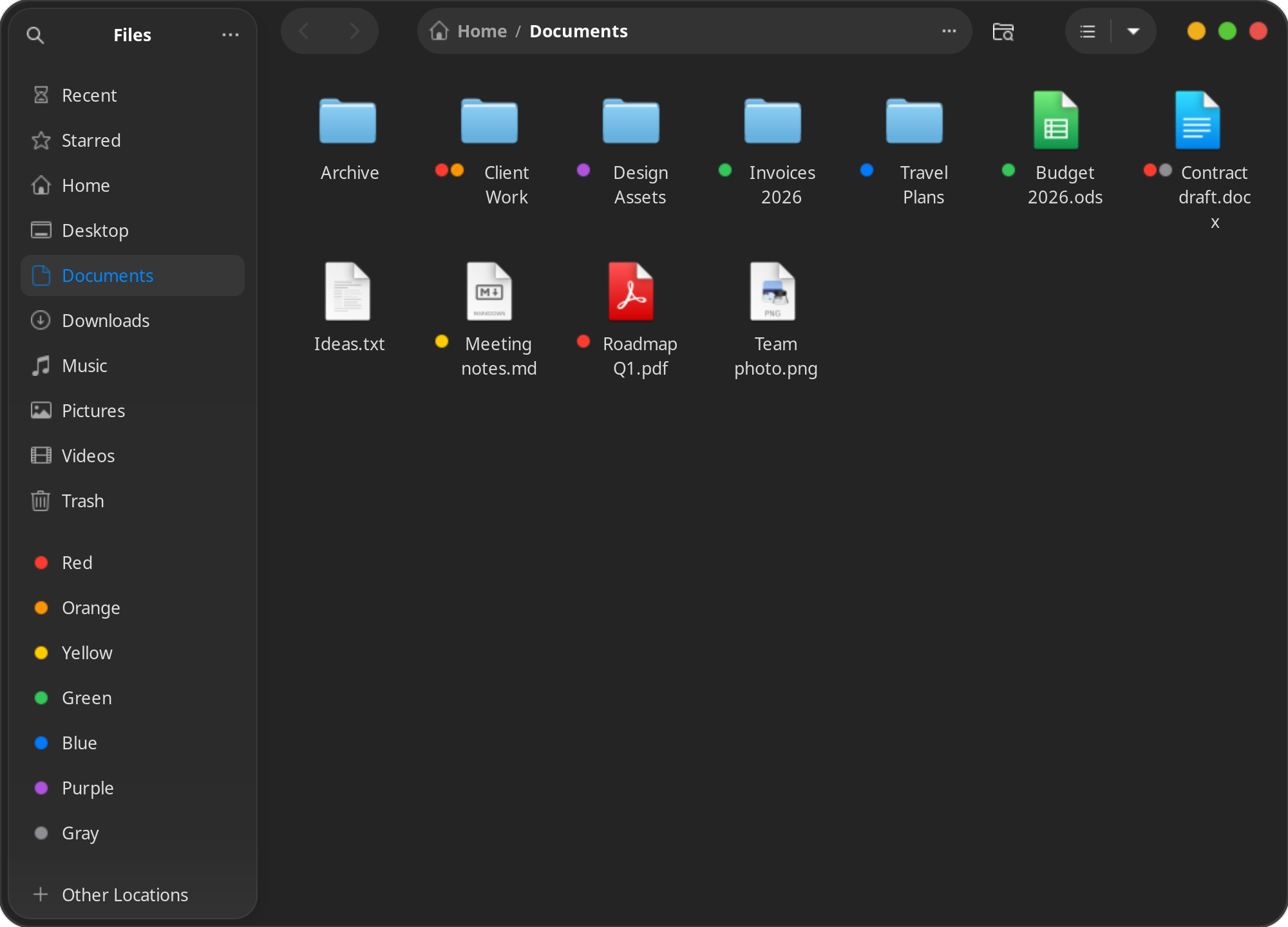
- Seven Finder colours in the right-click menu (Tags → Red, Orange, Yellow, Green, Blue, Purple, Gray), on one or many files and folders.
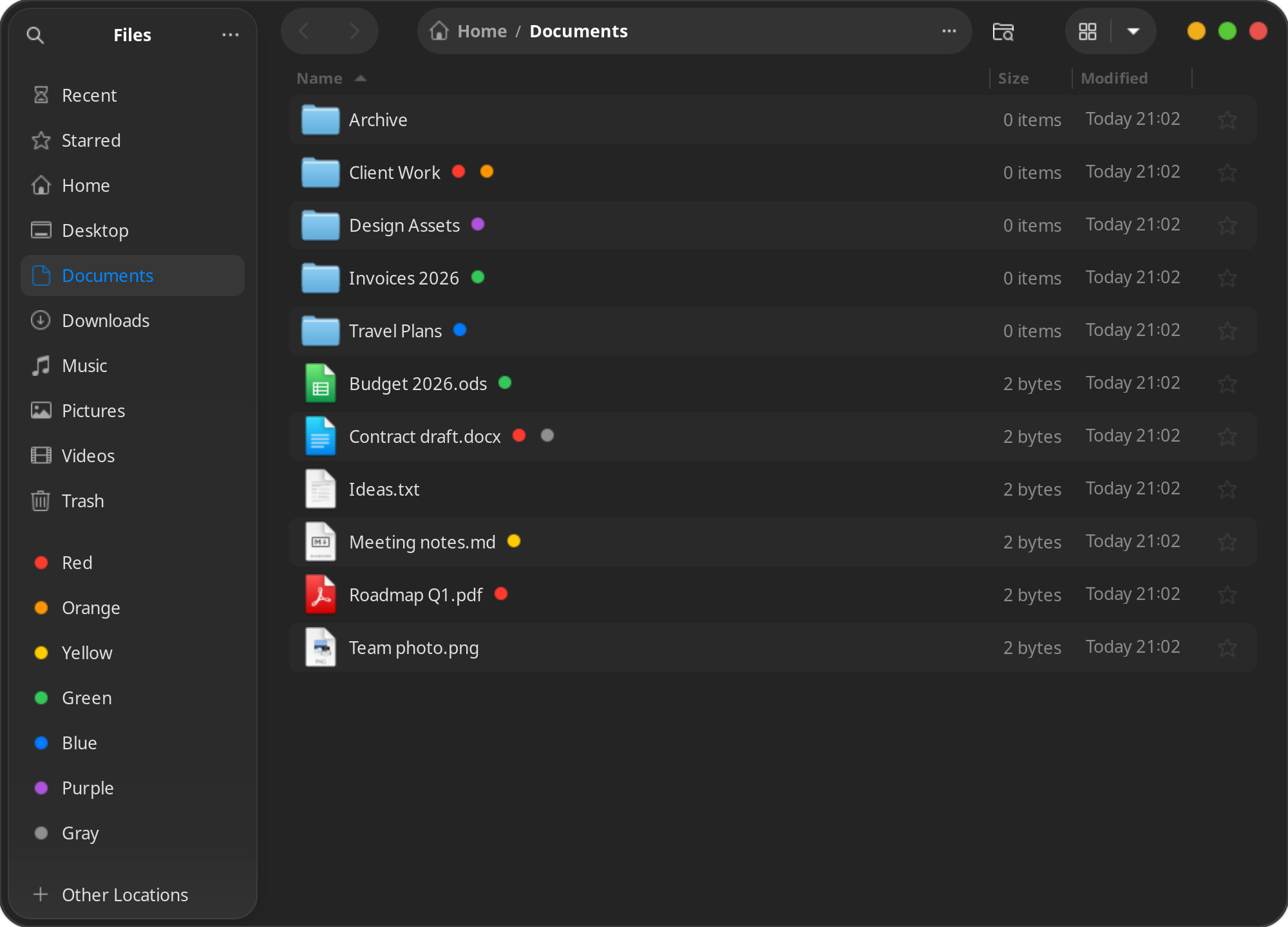
- Coloured dots before the name in grid view and after it in list view.
- Tags in the sidebar: click one and you see everything with that tag.
- Tags stay on the file, so they survive renames and moves.
The whole thing is one Python file, file_tags.py, loaded by nautilus-python, plus an install script and a small systemd user timer.
Where does a tag live?
This was the first and most important decision. I could keep a database somewhere in ~/.local/share mapping paths to tags, but then every rename or move breaks it.
Instead the tag lives on the file itself, in an extended attribute called user.xdg.tags. That attribute follows the file on renames and moves, and as a nice bonus Dolphin reads the same one, so tags are not locked into my extension.
ATTR = "user.xdg.tags" def read_tags(path): try: return os.fsdecode(os.getxattr(path, ATTR)).split(",") except OSError: # no tags, a broken link, or a filesystem without xattrs return []
Writing a tag has one rule I was careful about: other apps' tags in this attribute must survive. If Dolphin or something else put its own tag there, I only add or remove my colour and keep the rest:
def set_tag(path, color, on): path = os.path.realpath(path) # the file may be picked from inside a tag folder tags = read_tags(path) if (color in tags) != on: tags = [t for t in tags if t != color] + ([color] if on else []) if tags: os.setxattr(path, ATTR, os.fsencode(",".join(tags))) else: os.removexattr(path, ATTR) (add_link if on else remove_link)(path, color)
The downside of xattrs is that some places simply drop them: FAT and exFAT drives, git, and tools that do not copy xattrs (cp without -a, rsync without -X). I wrote that down in the README instead of pretending it is not a problem.
The menu: nautilus-python providers
The right-click menu and the emblems come from the normal nautilus-python API. The extension class implements MenuProvider and InfoProvider:
class FileTags(GObject.GObject, Nautilus.MenuProvider, Nautilus.InfoProvider): def update_file_info(self, file): path = file.get_location().get_path() for tag in read_tags(path) if path else []: if tag in COLORS: file.add_emblem(f"tag-{tag}") def get_file_items(self, files): # one "Tags" item with a submenu of seven colours, # each one checked if all selected files already have it ...
Clicking an already checked colour removes it, so untagging is the same gesture as tagging. If a file cannot be tagged (read-only, or on a filesystem without xattrs), I collect the errors and show one notify-send notification instead of failing silently.
The sidebar, without a sidebar API
Here is where it got interesting. The Nautilus extension API cannot add a sidebar section. So how do you get a list of tags in the sidebar?
The trick: every tag is a folder of symlinks in ~/.local/share/file-tags/red, .../blue and so on, and the sidebar entries are just ordinary GTK bookmarks to those folders. Clicking "Red" in the sidebar opens a folder full of links to all your red files.
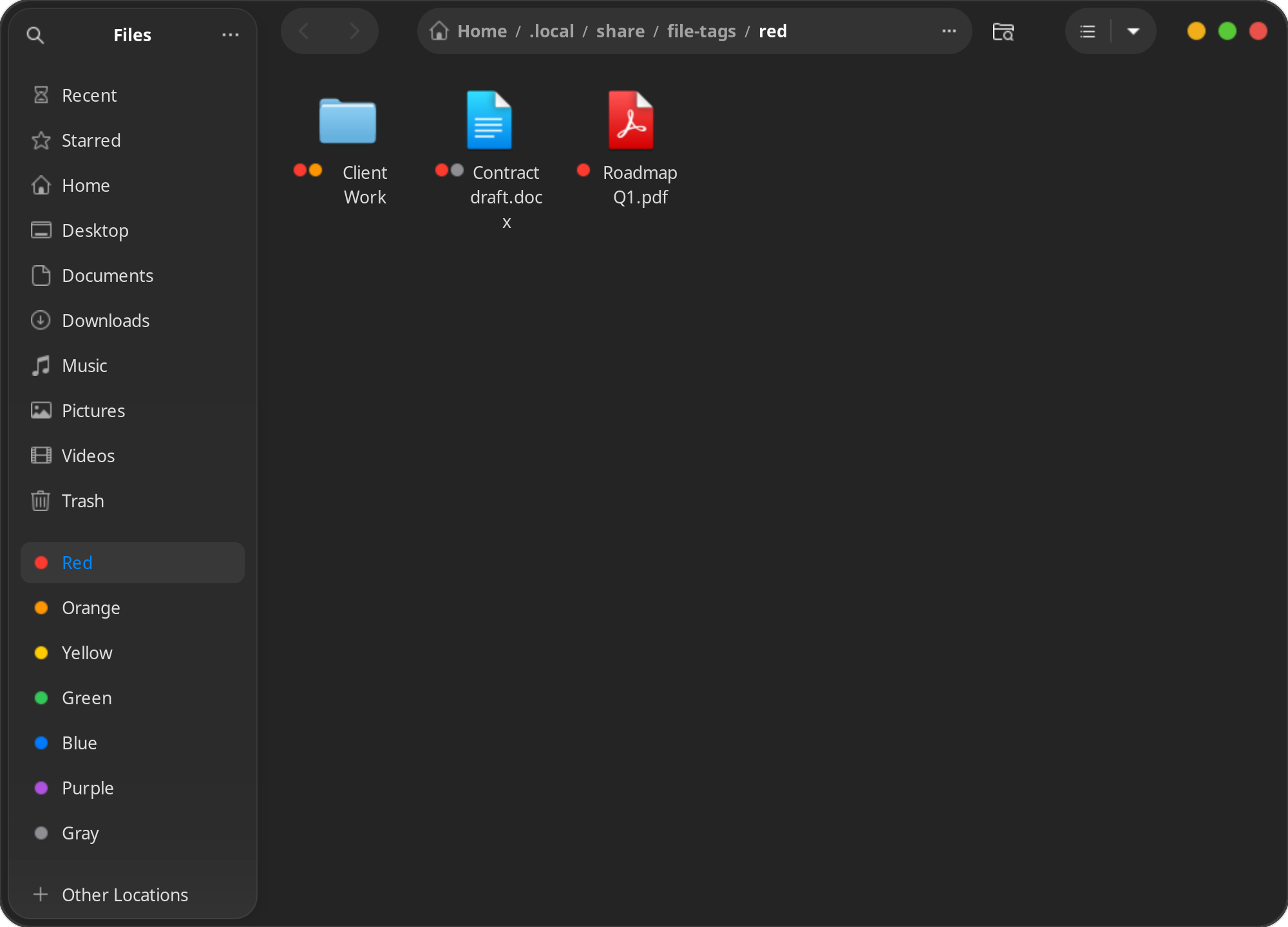
A nice side effect is that the bookmark label doubles as the tag name. If you rename the bookmark in the sidebar, the tag is renamed in the right-click menu too, because the menu reads labels from the bookmarks file.
I was also careful with that bookmarks file, because it is the user's file, not mine. It is written to a temporary file and then moved into place, so a crash can never leave someone's bookmarks cut in half:
with open(BOOKMARKS + ".tmp", "w", encoding="utf-8") as out: out.write("\n".join(lines) + "\n") os.replace(BOOKMARKS + ".tmp", BOOKMARKS)
Keeping the folders in sync
Symlink folders go stale: you move a tagged file, and the link now points to nothing. Since the xattr is the source of truth, the fix is a rescan that brings the folders back in line with the attributes. It only ever touches symlinks, and it skips hidden folders, node_modules and __pycache__.
The install script sets up a systemd user timer for it, with low priority so it does not get in the way:
[Service] Type=oneshot Nice=19 IOSchedulingClass=idle ExecStart=/usr/bin/python3 $EXT/file_tags.py rescan [Timer] OnStartupSec=1min OnUnitActiveSec=10min
So a moved file reappears in its tag folder within ten minutes, or immediately if you run the rescan command yourself. And deleting a link in a tag folder does not untag the file: the next sync puts it back, because the tag lives on the file.
Drawing the dots: going around the API
The API also cannot draw dots next to file names. Emblems exist, but Nautilus puts them beside the icon, not where Finder shows the colour.
So I did something slightly naughty: since the extension runs inside the Nautilus process, it can walk Nautilus's own GTK 4 widget tree and rearrange it. In grid view it moves the emblem box from beside the icon to a row before the name. In the sidebar it swaps the bookmark's folder icon for a coloured dot. Inside tag folders it hides the symlink arrow, because everything there is a link anyway.
There is no signal an extension can reach when new rows and cells are created, so this runs on a timer:
def decorate(): # polls because rows and cells are created with no signal an extension can reach for window in Gtk.Window.list_toplevels(): for widget in walk_mapped(window): kind = GObject.type_name(widget) if kind == "NautilusGtkSidebarRow": dress_sidebar_row(widget) elif kind in ("NautilusGridCell", "NautilusNameCell"): hide_link_emblem(widget) elif widget.has_css_class("icon-ui-labels-box"): dress_grid_cell(widget) return GLib.SOURCE_CONTINUE
It runs every half a second and only walks mapped widgets. The cost is that a dot on a brand new cell can appear with a small delay, which I can live with.
This is obviously fragile against Nautilus upgrades, so every step checks that the layout looks exactly as expected before touching it. It is tested on Nautilus 46. If a future version changes its layout, the dot simply falls back to sitting beside the icon and the sidebar shows a folder icon again. Tagging itself keeps working, because it never depended on the widget hacks.
Small details
- The dot icons are tiny generated SVGs, one circle per colour. I keep them in the extension's own folder and add it to the icon theme search path, because a stale
icon-theme.cachein hicolor was hiding new icons until some other app rebuilt it. - Themes dim sidebar icons, which made the colours look muted, so a small CSS provider resets the opacity for tag rows.
- With two tags on one file, the dots were squeezing names into mid-word wraps, so the emblem padding got trimmed.
Installing
./install.sh # asks for sudo once if python3-nautilus is missing nautilus -q # restart Nautilus
The script copies the extension into ~/.local/share/nautilus-python/extensions, creates the tag folders, icons and bookmarks (safe to re-run, it keeps your renames), and enables the rescan timer. There are also tests: python3 test_file_tags.py.
Conclusion
Nautag was a fun exercise in working around an API instead of fighting it. The extension API gives you menus and emblems; everything else comes from reusing what GNOME already has: xattrs for storage, bookmarks for the sidebar, symlink folders for "show me everything red", and a careful bit of widget surgery for the dots.
If you also miss Finder tags on Ubuntu, grab it from GitHub and let me know how it works on your setup.