
Introduction
In this tutorial, we'll explore how to create a modern landing page using React and a particle effect background. We'll use the react-tsparticles library to add a dynamic and interactive particle effect to our landing page background.
Particle Background Component
Prerequisite
As always first thing we need to do is to install dependencies necessary for particles to work. We need react-tsparticle as well as tsparticles-slim on which react-tsparticles is dependent on.
npm install react-tsparticles npm i tsparticles-slim
Setting up
First, let's create a reusable component for the particle background. We'll use the Particles component from the react-tsparticles library. Here's how you can set up the Particle Background component:
import React, { useCallback } from "react"; import Particles from "react-tsparticles"; import { loadSlim } from "tsparticles-slim"; const ParticlesBackground = () => { const particlesInit = useCallback(async (engine) => { await loadSlim(engine); }, []); const particlesLoaded = useCallback(async (container) => { await console.log(container); }, []); return ( <Particles id="tsparticles" init={particlesInit} loaded={particlesLoaded} options={{ // Customize particle options here }} /> ); }; export default ParticlesBackground;
Good thing with react-tsparticles is that it is really configurable, so you can set it up by your needs and preferences. For all available options you can refer to its documentation where it all described pretty much in details so i wont go further into details.
Particles configuration breakdown
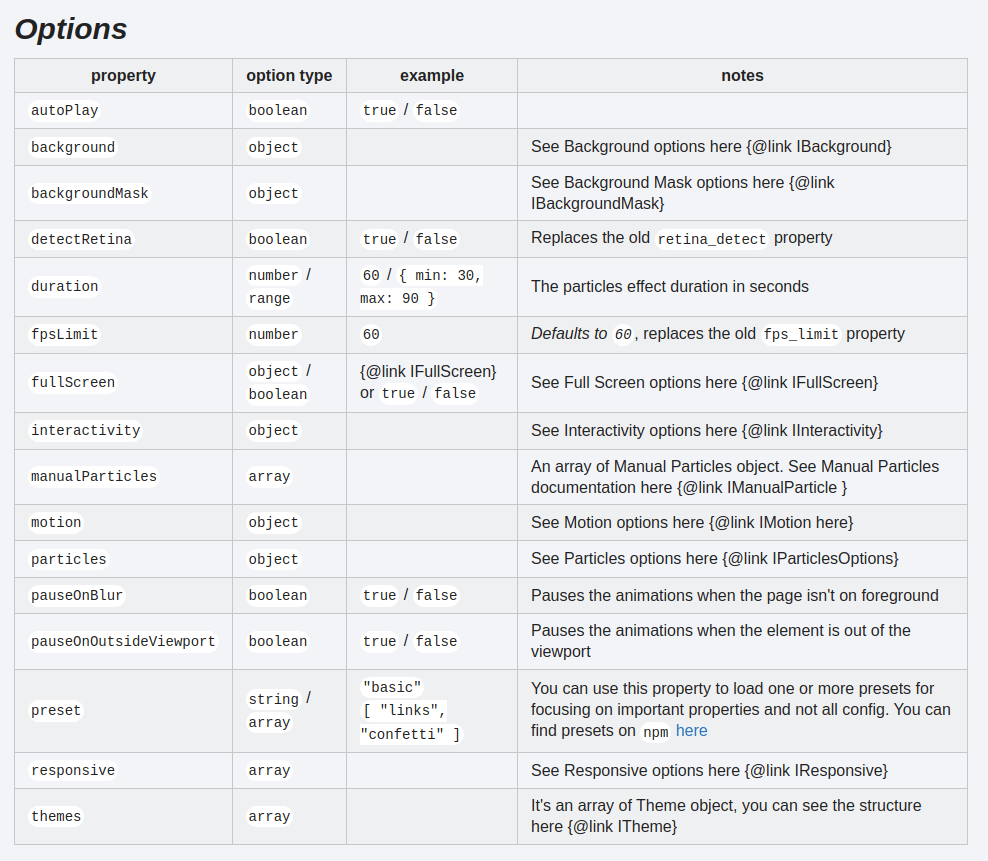
Particles options overview
Integrating Particle Background into the Landing Page
Now, let's integrate the Particle Background component into our landing page. We'll add it as the background of a section in our landing page layout:
import React from "react"; import ParticlesBackground from "./ParticlesBackground"; const LandingPage = () => { return ( <div className='bg-gradient-to-b from-neutral-900 to-[#7928ca] '> <ParticlesBackground /> <div className=' text-slate-200 md:px-10 px-5 '> {/* Content for the landing page */} </div> </div> ); }; export default LandingPage;
Before and After
Before
Before implementation of particles, as you can see it, landing page is pretty minimalistic, gradient background and some text.

Landing page without Particles
After
So you can see difference between landing with and without particles, it looks more modern and more cool in my opinion.

Landing page with Particles
Landing page with particles
Conclusion
With the react-tsparticles library, we can easily add dynamic and interactive particle backgrounds to our React applications. This adds a modern and visually appealing touch to our landing pages, making them stand out and engage users effectively. Feel free to customize the particle options to fit your design requirements and create stunning landing pages for your projects.