
Introduction
Every time I pick up my phone, the Dynamic Island shows me what is playing, how long a timer has left or that AirPods just connected. Then I go back to the laptop, and on GNOME the same information is spread across the top bar, the quick settings menu and a volume pop-up in the middle of the screen.
So I built it: Dynamic Island for GNOME, a GNOME Shell extension that puts a small black pill at the top of the screen. It shows the current track with its cover art, opens up on hover with playback controls, and doubles as the place where volume, brightness, charging, screen recording, Bluetooth and download progress show up.
It's published on the official extensions site, so you can install it with one click: Dynamic Island on extensions.gnome.org. The code is on GitHub.
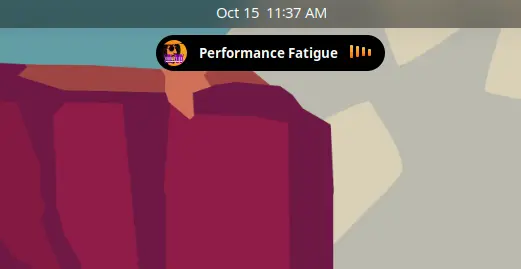
What it does
Hover over it and it springs open with the cover, artist and controls:
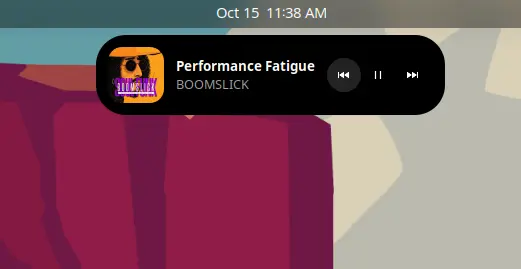
Now playing: Spotify, YouTube in Firefox or Chrome, or any other MPRIS player, with cover art, title, artist and a small animated equalizerHover to expand: the island springs open with bigger art and previous / play-pause / next buttons; click it to raise the player windowVolume and brightness: replaces GNOME's on-screen pop-up with a level bar inside the islandCharger: a short toast when you plug in or unplugScreen recording: a red dot with the elapsed time; click to stopBluetooth: a toast when headphones or a mouse connectProgress: download and file copy progress from apps that report it
Every feature except media can be switched off in the preferences, and the island can sit in any of six positions (top or bottom, left, center or right) with a configurable margin from the edge.
How a GNOME extension is put together
A GNOME Shell extension is plain JavaScript (GJS, which is SpiderMonkey with GObject bindings) loaded into the shell process itself. That means no sandbox and no separate window: your code builds actors directly on the shell's stage, with the same toolkit (St on top of Clutter) the top bar and the overview are built with.
The entry point is small on purpose. The extensions review team asks for enable() and disable() to create and destroy everything, and nothing to happen at import time:
const SOURCES = [MediaSource, OsdSource, BatterySource, RecordingSource, BluetoothSource, ProgressSource]; export default class DynamicIslandExtension extends Extension { enable() { this._settings = this.getSettings(); this._island = new Island(this._settings); Main.layoutManager.addTopChrome(this._island); this._sources = SOURCES.map(Source => new Source(this._island, this._settings)); } disable() { this._sources.forEach(source => source.destroy()); this._sources = null; this._island.destroy(); this._island = null; this._settings = null; } }
The split is the whole architecture. Island is one widget that knows how to look: show a player, show a toast with an optional level bar, show small indicator chips. Each source knows one thing about the system and tells the island about it. Adding a new feature means writing a new source, without touching the widget.
Media: listening to MPRIS over D-Bus
On Linux, media players announce themselves on the session D-Bus under names starting with org.mpris.MediaPlayer2.. Spotify does it, Firefox and Chrome do it for every tab that plays video, and so does almost every desktop player. GNOME Shell already ships a small MprisPlayer wrapper for its own media widget, so I reuse it.
The media source asks D-Bus for the names that exist right now, then subscribes to NameOwnerChanged to catch players that start later:
Gio.DBus.session.signal_subscribe('org.freedesktop.DBus', 'org.freedesktop.DBus', 'NameOwnerChanged', '/org/freedesktop/DBus', 'org.mpris.MediaPlayer2', Gio.DBusSignalFlags.MATCH_ARG0_NAMESPACE, (connection, sender, path, iface, signal, params) => { const [name, oldOwner, newOwner] = params.deepUnpack(); if (newOwner && !oldOwner) this._addPlayer(name); });
One detail cost me an evening: with MATCH_ARG0_NAMESPACE, the namespace must not end with a dot. org.mpris.MediaPlayer2. silently matches nothing.
When several players are open, the rule is simple: a player that starts playing takes over the island. Pause Spotify and press play on a YouTube tab, and the island switches to YouTube. Close the current player and it falls back to whichever one is still playing.
Volume and brightness without the pop-up
GNOME shows volume and brightness changes in a pop-up in the middle of the screen, drawn by Main.osdWindowManager. There is no API to replace it, so the OSD source does the honest monkey-patch: it keeps the original show method, swaps in its own, and puts the original back on disable():
osd.show = (monitorIndex, icon, label, level, maxLevel) => { if (!settings.get_boolean('show-volume')) { this._originalShow.call(osd, monitorIndex, icon, label, level, maxLevel); return; } const hasLevel = typeof level === 'number'; island.toast(icon, hasLevel ? '' : label ?? '', {level: hasLevel ? level : null, duration: 1500}); };
Turning the feature off in preferences works instantly, because the check happens on every call instead of once at startup.
The other sources
The rest follow the same pattern, each a few dozen lines:
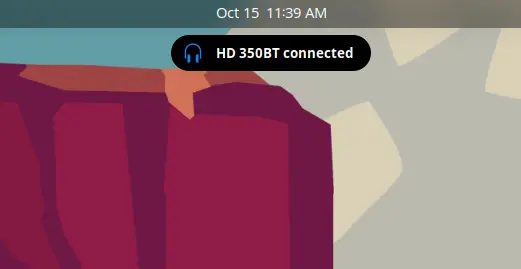
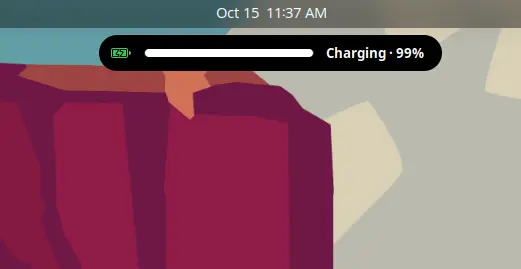
RecordingwatchesMain.screenshotUIforscreencast-in-progressand ticks a timer once a secondProgresslistens tocom.canonical.Unity.LauncherEntry, the same D-Bus signal docks use to draw progress on app icons, so Nautilus copies and browser downloads just workBatteryandBluetoothwatch UPower over D-Bus and the shell's own GnomeBluetooth client for state changes and show a short toast
Using the Unity LauncherEntry API for progress was the nicest surprise. I expected to hook into every app separately, and instead there is one signal that half the desktop already sends.
This is what a Bluetooth toast and the charger toast look like:
Making it feel like the real thing
The first version worked, and it felt wrong. GNOME's built-in ease() animations use fixed curves like ease-out-quad, and the island growing in a straight line looked like a dropdown, not like Apple's island, which springs.
So the expand animation uses a damped spring, written out by hand:
// Damped spring (response 0.45s, damping 0.78 → ~2% overshoot), t in seconds → progress const OMEGA = 2 * Math.PI / 0.45; const ZETA = 0.78; const OMEGA_D = OMEGA * Math.sqrt(1 - ZETA * ZETA); const spring = t => 1 - Math.exp(-ZETA * OMEGA * t) * (Math.cos(OMEGA_D * t) + ZETA * OMEGA / OMEGA_D * Math.sin(OMEGA_D * t));
A Clutter.Timeline runs for 650 ms and on every frame interpolates width, height, corner radius, padding and cover art size with that progress value. A damping of 0.78 gives a tiny overshoot: enough to feel alive, not enough to wobble.
Two more things made the difference:
Rounding to whole pixels.Animating fractional sizes made the text and icons blurry while the island moved. Rounding width, height, padding and radius on every frame keeps them sharp.Hover intent.The island waits 90 ms before opening and 220 ms before closing, so moving the mouse across the top of the screen doesn't make it jump.
Track changes get their own small touch: the old title fades up and out, the cover shrinks, and the new one pops back in with an ease-out-back curve.
Getting through review
Publishing on extensions.gnome.org means a human reviewer reads your code. Mine came back with notes about imports and the entry point, and along the way I went through the rest of the review guidelines:
- don't pin GI versions in imports (
gi://Gtk?version=4.0), the shell picks them - keep the entry point small and create nothing outside
enable() - disconnect every signal and remove every GLib timeout in
disable(), because the extension can be turned off at any moment, for example on the lock screen
The last one is the real lesson. In a normal app, a leaked timer is a small bug. In the shell, it's code that keeps running inside the process that draws your whole desktop. Every source has a destroy() that undoes exactly what its constructor did, and the media source even checks whether it was destroyed before an async D-Bus reply arrives.
gnome-extensions pack only includes extension.js and prefs.js by default, so the build is a one-line script that lists the other modules:
gnome-extensions pack --force --extra-source=island.js --extra-source=sources .
Install it
The easiest way is the extensions site with the browser connector, or the Extension Manager app. From the zip:
gnome-extensions install --force dynamic-island@bjagetic.shell-extension.zip
Log out and back in (required on Wayland), then:
gnome-extensions enable dynamic-island@bjagetic
Settings live in the Extensions app under Dynamic Island, or:
gnome-extensions prefs dynamic-island@bjagetic
Conclusion
This was my first GNOME Shell extension, and the surprising part was how little code it takes once you find the right signal. MPRIS, the OSD manager, the screenshot UI and the Unity launcher API already carry everything the island needs; the extension mostly listens and draws.
The part that took the longest wasn't the features but the feel: a spring curve, whole-pixel rounding and a 90 ms delay. If you're on GNOME, give it a try, and if your favorite player doesn't show up, open an issue on GitHub.