
Introduction
If you're new to JavaScript design patterns, this post is for you. We'll start with the basics, including an overview of what design patterns are and why they are important. From there, we'll move on to some of the most common design patterns in JavaScript, including the singleton pattern, the factory pattern, and the observer pattern. JavaScript design patterns are reusable solutions to common programming problems that can improve the organization, readability, and maintainability of your code. In this post, we'll introduce some of the most popular and useful design patterns in JavaScript and explain how to use them in your projects.
What is a Design Pattern
Design patterns are a key concept in software engineering and are especially important in JavaScript, where the dynamic and flexible nature of the language can make it difficult to write clean and maintainable code. In this post, we'll explore the benefits of using design patterns in JavaScript and provide some practical examples of how to apply them in your projects. As Wikipedia says on Software design patterns :
In software engineering, a software design pattern is a general, reusable solution to a commonly occurring problem within a given context in software design. It is not a finished design that can be transformed directly into source or machine code. Rather, it is a description or template for how to solve a problem that can be used in many different situations. Design patterns are formalized best practices that the programmer can use to solve common problems when designing an application or system.
You can find more detailed post and learn more about design patterns in nodejs and their usage. If you want to read more about JS Vanilla patterns, be sure to checkout patterns.dev website.
Anti-patterns
Creational Design Patterns
Singleton Pattern
As is often said, old but gold, Singleton pattern is one of the most used patterns.
The singleton pattern ensures that a class has one and only one instance, and provides a global point of access to it.
The Singleton Pattern ensures that a class has only one instance and provides a global point of access to that instance, commonly used for managing resources such as database connections or configuration settings. It guarantees that there is only one instance of a class throughout the application's lifecycle, promoting resource efficiency and centralized control.
What makes Singleton, is global access to the instance usually with Singleton.getInstance() so we do not call new Singleton() directly.
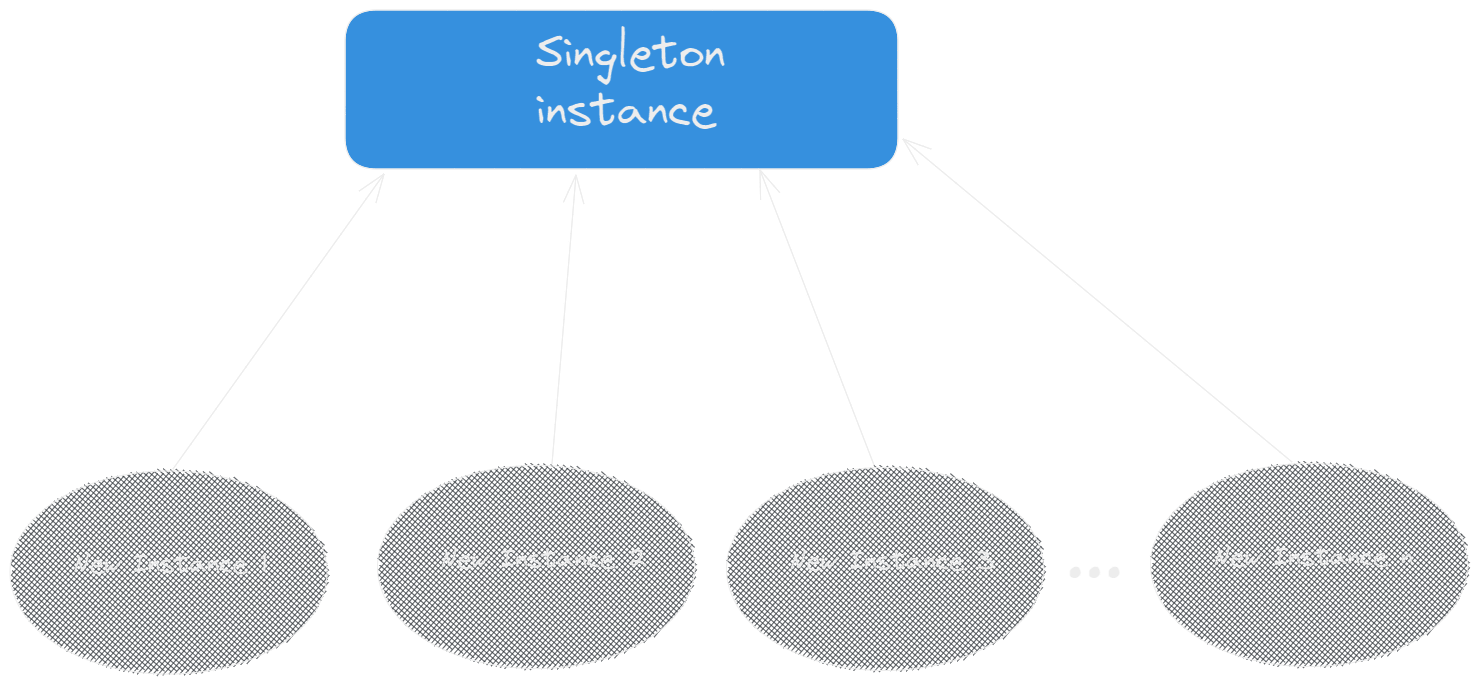
Singleton pattern
Here's an example of a singleton in JavaScript:
const Singleton = (() => { let instance; function createInstance() { // Private variables and methods return { // Public methods and variables }; } return { getInstance: () => { if (!instance) { instance = createInstance(); } return instance; } }; })(); const singletonInstance1 = Singleton.getInstance(); const singletonInstance2 = Singleton.getInstance(); console.log(singletonInstance1 === singletonInstance2); // Output: true
Lets summarize Singleton pattern and most important thing you should know:
- Ensures we have only one instance of the class or object
- It is shared globally between multiple files inside application, also all imports have access and reference to the same instance
- It can be mutable or immutable, but with singleton we need to make sure it is thread-safe if used in multiple threads where
Factory Pattern
The factory pattern is a creational pattern that provides an interface for creating objects in a super class, but allows subclasses to alter the type of objects that will be created.
The Factory Pattern is a blueprint for making objects. It lets subclasses change the kind of objects made without needing to know the exact class of the object made. This pattern hides the details of object creation, making the code easier to maintain and scale.
Here's an example of a factory in JavaScript:
class ShapeFactory { createShape(type) { if (type === 'circle') { return new Circle(); } else if (type === 'square') { return new Square(); } } } class Circle { draw() { console.log('Drawing a circle'); } } class Square { draw() { console.log('Drawing a square'); } } const shapeFactory = new ShapeFactory(); const circle = shapeFactory.createShape('circle'); circle.draw(); // "Drawing a circle" const square = shapeFactory.createShape('square'); square.draw(); // "Drawing a square"
Builder pattern
In this design pattern, the focus is to separate the construction of complex objects from their representation. In Node.js builder, the pattern is a way to create complex objects in a step-by-step manner.
When there are multiple ways to create an object or many properties inside the object, seasoned developers usually opt for builder design patterns. The essence of the builder design pattern is to break down complex code into smaller and more manageable steps, so this design pattern makes it easier to modify the complex code easily over time.
class House { constructor(builder) { this.bedrooms = builder.bedrooms; this.bathrooms = builder.bathrooms; this.kitchens = builder.kitchens; this.garages = builder.garages; } } class HouseBuilder { constructor() { this.bedrooms = 0; this.bathrooms = 0; this.kitchens = 0; this.garages = 0; } setBedrooms(bedrooms) { this.bedrooms = bedrooms; return this; } setBathrooms(bathrooms) { this.bathrooms = bathrooms; return this; } setKitchens(kitchens) { this.kitchens = kitchens; return this; } setGarages(garages) { this.garages = garages; return this; } build() { return new House(this); } } const house1 = new HouseBuilder() .setBedrooms(3) .setBathrooms(2) .setKitchens(1) .setGarages(2) .build(); console.log(house1); // Output: House { bedrooms: 3, bathrooms: 2, kitchens: 1, garages: 2 }
Module Pattern
The Module Pattern encapsulates "privacy", state, and organization using closures, allowing for the creation of private variables and methods within a module, promoting encapsulation and reducing global namespace pollution. It provides a way to organize code into self-contained units, making it easier to manage and maintain large-scale applications.
const Counter = (() => { let count = 0; const increment = () => { count++; }; const decrement = () => { count--; }; const getCount = () => { return count; }; return { increment, decrement, getCount }; })(); Counter.increment(); Counter.increment(); console.log(Counter.getCount()); // Output: 2
Prototype Pattern
The Prototype Pattern creates new objects based on a prototype of an existing object through cloning, allowing for the creation of new objects without explicitly specifying their class and promoting flexibility and reusability. It is particularly useful when the construction of a new object is more efficient by copying an existing object rather than creating it from scratch.
const carPrototype = { drive() { console.log('Driving'); }, stop() { console.log('Stopping'); } }; function createCar(make, model) { const car = Object.create(carPrototype); car.make = make; car.model = model; return car; } const car1 = createCar('Toyota', 'Corolla'); const car2 = createCar('Honda', 'Civic'); car1.drive(); // Output: Drivin car2.stop(); // Output: Stopping
Structural Design Patterns
Decorator
The Decorator Pattern dynamically adds behavior to individual objects, allowing behavior to be added or removed at runtime, without affecting the behavior of other objects from the same class, promoting extensibility and modularity. It follows the open-closed principle, allowing for the addition of new functionality without modifying existing code.
class Car { drive() { console.log('Driving'); } } class CarDecorator { constructor(car) { this.car = car; } drive() { this.car.drive(); this.decorate(); } decorate() { console.log('Adding additional features'); } } const basicCar = new Car(); const decoratedCar = new CarDecorator(basicCar); decoratedCar.drive(); // Output: Driving, Adding additional features
Proxy Pattern
Provides a surrogate or placeholder for another object to control access to it.
Adapter Pattern
Facade Pattern
The Facade Pattern provides a simplified interface to a larger body of code, hiding the complexity of the underlying system and providing a way to interact with the system through a single, easy-to-use interface. It promotes encapsulation by providing a unified interface to a set of interfaces in a subsystem, making it easier to use and understand.
class Subsystem1 { operation1() { console.log('Subsystem1 operation1'); } } class Subsystem2 { operation2() { console.log('Subsystem2 operation2'); } } class Facade { constructor() { this.subsystem1 = new Subsystem1(); this.subsystem2 = new Subsystem2(); } operation() { this.subsystem1.operation1(); this.subsystem2.operation2(); } } const facade = new Facade(); facade.operation(); // Output: Subsystem1 operation1, Subsystem2 operation2
Behavioral Design Patterns
Chain of Responsibility Pattern
The Chain of Responsibility Pattern passes a request along a chain of handlers, allowing multiple objects to handle the request without knowing which object will ultimately process it. It decouples the sender of a request from its receiver, allowing for greater flexibility in handling requests and promoting the creation of reusable and interchangeable components.
class Handler { constructor() { this.nextHandler = null; } setNext(handler) { this.nextHandler = handler; return handler; } handleRequest(request) { if (this.nextHandler) { this.nextHandler.handleRequest(request); } } } class ConcreteHandler1 extends Handler { handleRequest(request) { if (request === 'type1') { console.log('Handled by ConcreteHandler1'); } else { super.handleRequest(request); } } } class ConcreteHandler2 extends Handler { handleRequest(request) { if (request === 'type2') { console.log('Handled by ConcreteHandler2'); } else { super.handleRequest(request); } } } const handler1 = new ConcreteHandler1(); const handler2 = new ConcreteHandler2(); handler1.setNext(handler2); handler1.handleRequest('type1'); // Output: Handled by ConcreteHandler1 handler1.handleRequest('type2'); // Output: Handled by ConcreteHandler2
Observer Pattern
The observer pattern is a behavioral pattern that allows an object (the subject) to notify other objects (the observers) when its state changes. This pattern is often used for event-driven programming.
Here's an example of the observer pattern in JavaScript:
class Subject { constructor() { this.observers = []; } subscribe(observer) { this.observers.push(observer); } unsubscribe(observer) { this.observers = this.observers.filter(o => o !== observer); } notify(data) { this.observers.forEach(observer => observer.update(data)); } } class Observer { constructor(name) { this.name = name; } update(data) { console.log(`${this.name} received update: ${data}`); } } const subject = new Subject(); const observer1 = new Observer('observer 1'); const observer2 = new Observer('observer 2'); subject.subscribe(observer1); subject.subscribe(observer2); subject.notify('some data'); // "observer 1 received update: some data" // "observer 2 received update: some data"